API-Gateway
Architecture
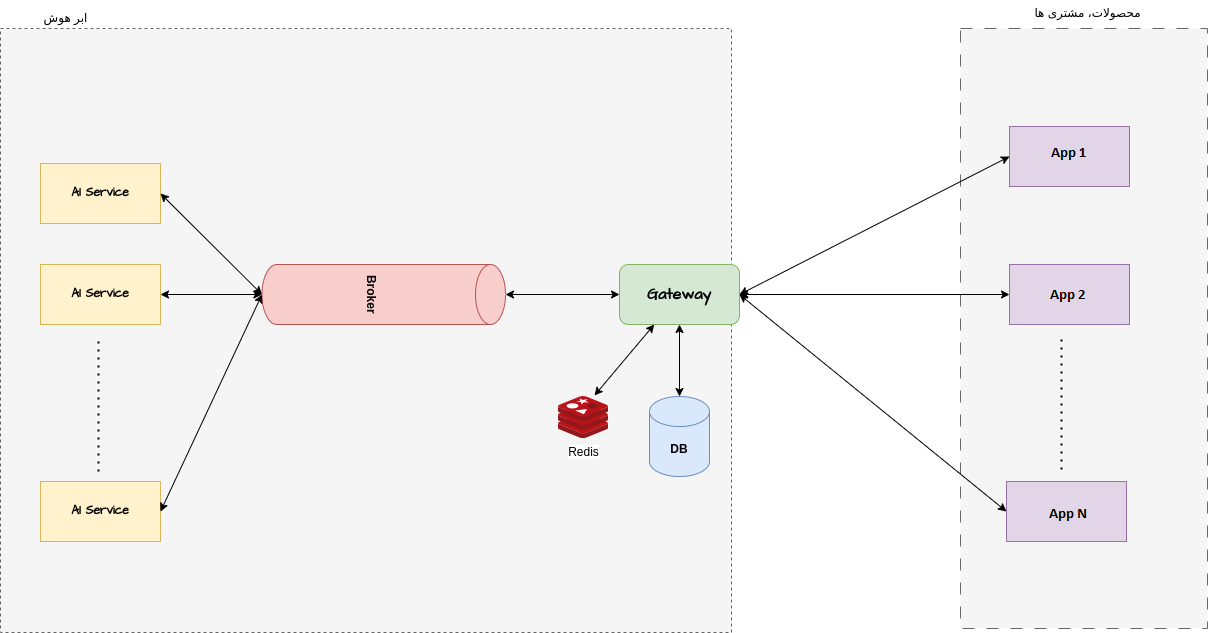
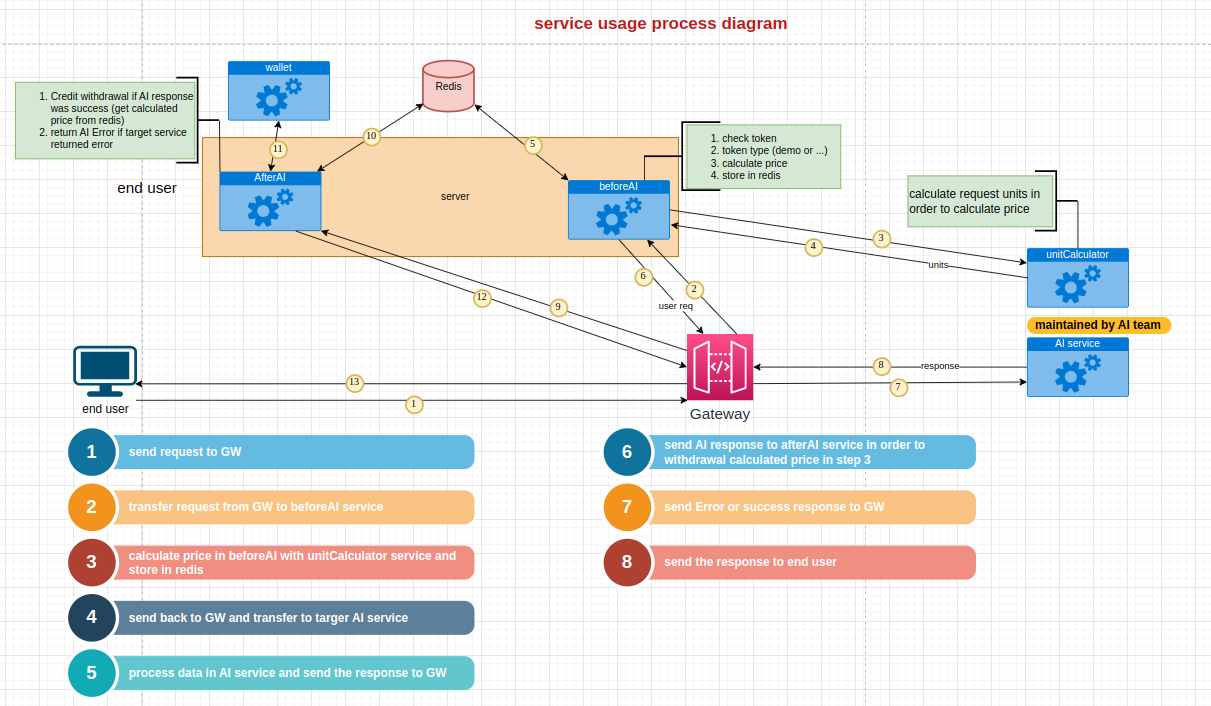
Based on below image, instead of AI services can be every kind of Service or API on your desire business logic like: carbon market, cloud services, bank, or feeds and etc,.
The significant feature of the Gateway is no vendor lock-in and for looking at another features please keep going and go through, you will find it.
Initialization
Package.json
During the initial package installation, be sure to use npm to carry out the installation process and strictly avoid using pnpm, as it will lead to several errors. However, it is possible that after installing with npm, you can execute the work and run scripts using pnpm. Therefore, in this section, several suitable commands have been provided for use, especially one of the most important ones is pnpm:clean.
    "pnpm:version": "pnpm --version",
    "pnpm:yourpackage": "pnpm view yourpackage versions",
    "pnpm:clean": "find ./ -name node_modules -type d -exec rm -rf {} +",
    "pnpm:update": "pnpm -r update -i -L",
    "pnpm:dedupe": "pnpm dedupe --check",
    "pnpm:check": "pnpm run lint:md && pnpm run lint:fix && pnpm run compile",
    "pnpm:dev": "nodemon src/index.js",
    "deps": "pnpm update -i --latest -r",
    "pnpm:start": "pnpm run build:live",
    "debug": "DEBUG=http,express:*,app:* nodemon index.js",
    "node:dev": "cross-env NODE_ENV=development node -r esm ./src/index",
    "node:inspect": "cross-env NODE_ENV=development && cross-env NODE_INSPECT_RESUME_ON_START=1 node inspect ./src/modules/users/users.controller.js",
    "node:inspect:9223": "cross-env NODE_ENV=development && cross-env NODE_INSPECT_RESUME_ON_START=1 node --inspect=9223 ./src/modules/users/users.controller.js"
Docker
Occocionally, To set the correct time for the time_log variable in Docker, which sometimes can be problematic, you can use the following command inside your Dockerfile:
RUN echo "date '+%Y-%m-%d %H:%M:%S'" > /etc/timezone
This command will set the system’s timezone to match the local timezone, which should help with populating the time_log variable correctly. Remember to replace the timezone format and value according to your specific needs.
ENV TZ="Asia/Tehran"
ExpressJS
The two main objects, namely request and response, undergo changes throughout all sections of the program. Therefore, paying attention to the components of this section can be helpful to you.
Request
Includes:
{
    "req" :  {
        "body": {
            "type": {},
            "userId": {},
            "occlusion": {},
        },
        "headers": {},
        "originalUrl": {},
        "method" : {
            "get": {},
            "post": {},
        },
        "requestType" : {},
        "srtProxy" : {},
        "projectName": {},
        "accessAiService": {
            "Service" : {
                "host": {},
                "protocol": {},
                "rejectUnauthorized": {},
            }
        },
        "serviceName" : {},
        "path": {},
        "hasFile" : {},
        "filePath" : {},
        "file": {
            "howGet" : {},
        },
        "files": {},
        "ip": {},
        "query": {},
        "params": {},
        "user": {},
        "clause": {},
        "isAllowedIP" : {},
        "gatewayLogData":{},
    }
}
Response
{
    "res": {
        "locals": {},
        "requestId" : {},
        "sendFile": {},
        "json": {},
        "data": {
            "status":{},
            "message": {
                "data" : {}
            }
       },
    }
}
Structure of log
{
    "log" : {
       "requestId":{},
        "meta": {
          "userAgent": {},
          "ip": {},
          "method": {},
          "originalUrl": {},
          "path": {},
        },
        "data": {
          "status" : {},
          "message" : {},
          "request" : {},
          "response" : {},
        },
    }
}
DB
Relations
Cascades
- If a ApiKey remove from ApiKeys then {only remove related records in the Apis}
- If a Service remove from Services then {only remove related records in the Apis}
- If a Project remove from Projects then {only remove related records in the Services}
- If a User remove from Users then {only remove related records in the ApiKeys and Apis}
- If a Api remove from Apis then will not affect on any tables.
RabbitMq
By executing the list command, you can see a list of installed plugins. Keep in mind that due to the use of the amqplib library, the program currently does not require the installation of plugin version 1. However, if a need arises on the Rabbit tool side, it is better to activate the desired plugin based on your own needs.
amqplib
A library for making AMQP 0-9-1 clients for Node.JS, and an AMQP 0-9-1 client for Node.JS v10+. This library does not implement AMQP 1.0 or AMQP 0-10.
rabbitmq-plugins list
Listing plugins with pattern ".*" ...
 Configured: E = explicitly enabled; e = implicitly enabled
 | Status: * = running on rabbit@451f4ab695e9
 |/
[E*] rabbitmq_amqp1_0                  3.13.1
[  ] rabbitmq_auth_backend_cache        (pending upgrade to 3.13.1)
[  ] rabbitmq_auth_backend_http         (pending upgrade to 3.13.1)
[  ] rabbitmq_auth_backend_ldap         (pending upgrade to 3.13.1)
[  ] rabbitmq_auth_backend_oauth2       (pending upgrade to 3.13.1)
[  ] rabbitmq_auth_mechanism_ssl        (pending upgrade to 3.13.1)
[  ] rabbitmq_consistent_hash_exchange  (pending upgrade to 3.13.1)
[E*] rabbitmq_event_exchange           3.13.1
[e*] rabbitmq_federation               3.13.1
[  ] rabbitmq_federation_management     (pending upgrade to 3.13.1)
[  ] rabbitmq_jms_topic_exchange        (pending upgrade to 3.13.1)
[E*] rabbitmq_management               3.13.1
[e*] rabbitmq_management_agent         3.13.1
[  ] rabbitmq_mqtt                      (pending upgrade to 3.13.1)
[  ] rabbitmq_peer_discovery_aws        (pending upgrade to 3.13.1)
[  ] rabbitmq_peer_discovery_common     (pending upgrade to 3.13.1)
[  ] rabbitmq_peer_discovery_consul     (pending upgrade to 3.13.1)
[  ] rabbitmq_peer_discovery_etcd       (pending upgrade to 3.13.1)
[  ] rabbitmq_peer_discovery_k8s        (pending upgrade to 3.13.1)
[E*] rabbitmq_prometheus               3.13.1
[  ] rabbitmq_random_exchange           (pending upgrade to 3.13.1)
[  ] rabbitmq_recent_history_exchange   (pending upgrade to 3.13.1)
[  ] rabbitmq_sharding                  (pending upgrade to 3.13.1)
[  ] rabbitmq_shovel                    (pending upgrade to 3.13.1)
[  ] rabbitmq_shovel_management         (pending upgrade to 3.13.1)
[E*] rabbitmq_stomp                    3.13.1
[E*] rabbitmq_stream                   3.13.1
[  ] rabbitmq_stream_management         (pending upgrade to 3.13.1)
[  ] rabbitmq_top                       (pending upgrade to 3.13.1)
[E*] rabbitmq_tracing                  3.13.1
[  ] rabbitmq_trust_store               (pending upgrade to 3.13.1)
[e*] rabbitmq_web_dispatch             3.13.1
[  ] rabbitmq_web_mqtt                  (pending upgrade to 3.13.1)
[  ] rabbitmq_web_mqtt_examples         (pending upgrade to 3.13.1)
[  ] rabbitmq_web_stomp                 (pending upgrade to 3.13.1)
[  ] rabbitmq_web_stomp_examples        (pending upgrade to 3.13.1)
Relation of web-app and AMQP
The project uses the AMQP protocol version 0-9-1 and has not utilized version one.
When you intend to use a service, first create a queue with the service’s name. Then, when you make a post request with the name of that service, you will see that the request will go to this queue. In the library present in the project, named broker, a random queue is created during initialization, and this is done by the program itself. Then, when sending an API request, the response is supposed to be received by the random queue and then sent to the main queue, which is named after the service. Note that if the message in the main queue is consumed, the API is deleted, and the execution of the program moves on to other codes. Therefore, if there is no consumption, the API remains in ‘sending’ status. If you intend to track messages in RabbitMQ, it is best to follow the steps below. In addition to the random queue created by our program, we have something called a tag, which is created by Rabbit as follows: This tag is actually related to the consumer of the random queue, and even if we have thousands of consumers from the queue, we will still have the same name format at the beginning of the tag.
amq.ctag-*
Policy
-
Create a durable queue as a name of your service
-
Create a new policy as
amq.gen-* -
Binding
From exchange: amq.direct
Routing key: VisionQuestionAnswering
Arguments: correlation_id  or conversation_id
// correlation_id/conversation_id(equal) are attributes of message
// if you use grafana you can only find conversation_id inthe section of search -> net.peer.port
When a request is sent from the API, you can take action in the message reception section of the main queue, which is named after the service. You can, for example, view the relevant message in the following format.
the server reported 0 messages remaining.
Exchange (AMQP default)
Routing Key VisionQuestionAnswering
Redelivered ○
Properties
reply_to: amq.gen-diLPs219ZPQ7rpZ5ewmAtQ
correlation_id: 4de512fe-c252-4456-9783-f7f820fd8875
headers:
traceparent: 00-d4a5db06430b944a1081030e47b3ae28-e532db78b29aaa7d-01
Payload
126 bytes
Encoding: string
{"imagePath":"/home/armanriazi/gw-projects/gateway/gateway/assets/uploads/gateway-file-95233335-f649-44bd-be89-9b0c7a166472.png"}
If you create a message for testing on the random queue with the mentioned ID, your program, which acts as the consumer of this queue, will enter the getMessageFromQueue method. However, if you publish a message in the main service queue, it will not go into your program, but you can see the messages inside this queue, unlike the random queue. The main reason is that your program is in the random queue state and consumes the published message, so you can no longer monitor it in the management UI section. But regarding the main queue named after your service, you are no longer a consumer, and you can view the message through the management section, where it may still be in the queue.
  traceId: '147280a3b91ebaf616adc777dd9152e4',
  parentId: undefined,
  traceState: undefined,
  name: 'amq.gen-3CrgyivK8a-NV6sz3DxhdQ process',
  id: '93cc7688d63127dd',
  kind: 4,
  timestamp: 1716273604511000,
  duration: 41770071.963,
  attributes: {
    'messaging.protocol_version': '0.9.1',
    'messaging.protocol': 'AMQP',
    'net.peer.name': '0.0.0.0',
    'net.peer.port': 5672,
    'messaging.system': 'rabbitmq',
    'messaging.destination': '',
    'messaging.destination_kind': 'topic',
    'messaging.rabbitmq.routing_key': 'amq.gen-3CrgyivK8a-NV6sz3DxhdQ',
    'messaging.operation': 'process',
    'messaging.conversation_id': '0b06889b-d952-43ec-b453-839c6c23b22c'